Publishing
In django CMS, “publishing” is not a core concept — it is a
contract that versioning packages plug into. This page explains what
the core actually guarantees, what djangocms-versioning (the
standard versioning package) adds on top, and why the model is
structured this way.
If you have not yet read Content objects: the grouper / content pattern, do that first. The grouper / content split is the foundation everything below stands on.
Without a versioning package
The django CMS core has no separate publish action. There is no
“draft” and there is no “published” — there is only the content row.
When an editor saves a PageContent row, the change is immediately
visible to anyone who can resolve a URL to that row.
In this mode:
one
Pagecan have manyPageContentrows, but only one per language,PageContent.objectsandPageContent.admin_managerreturn the same thing (there is nothing to hide),editing is publishing.
This is enough for development environments, single-author sites, or projects whose editorial workflow lives outside the CMS (e.g. content prepared in another tool and imported).
It is rarely enough for a production site with editors.
With djangocms-versioning
djangocms-versioning
is the standard versioning package endorsed by the django CMS
Association. The quickstart install includes it. It plugs into the
CMS through the CMSAppExtension contract and changes three things
about how content objects behave:
Many content rows per language are now allowed. Each new draft creates a new
PageContentrow. The grouper / content split was already there; versioning is what fills it with more than one row per language.Each content row gets a state. Draft, published, unpublished, or archived. The state is stored on a separate
Versionmodel that points at the content row.The default manager filters by state.
PageContent.objectsnow means “the published row for each language.”PageContent.admin_manageris the escape hatch that still returns every row.
Editing is no longer publishing. The “Publish” button promotes the current draft to published; the previous published row becomes unpublished; the new draft, when an editor next edits, becomes the new draft row.
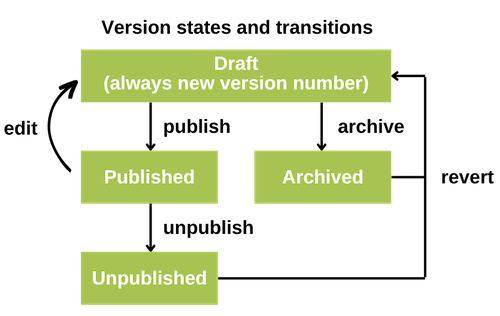
Version states
When djangocms-versioning is installed, each content row carries
one of four states.
- Draft
The version currently being edited. Only one draft per language at any time. Drafts are not visible to the public.
- Published
The version currently visible on the site. Only one published version per language at any time. Published rows cannot be edited in place — editing creates a new draft based on the published row.
- Unpublished
A row that was previously published and has been taken offline. Many unpublished rows can coexist, preserving the history of what was once live.
- Archived
A row that was never published. Archived rows preserve work that may be useful later and can be reverted to draft.
Each new draft increments a version number, giving a complete history of changes over all historically created versions including archived, and unpublished ones.
A page is publicly reachable when its current-language PageContent
row is in the Published state. Whether the page’s parents are
published does not affect its own reachability — pages stand on their
own URLs.
Apphooks and publishing
An apphook attached to a page inherits the page’s publishing state:
the apphook is reachable only when the page is published,
unpublishing the page takes the apphook offline as well.
This is consistent with how content objects compose with apphooks (How django CMS is composed): an apphook is a binding on the page, so it shares the page’s visibility.
The scope is wider than pages
djangocms-versioning does not version only pages. The contract
applies to any grouper / content pair an app registers. The most
common second example is djangocms-alias — aliases get the
same draft / published / unpublished / archived states as pages, with
the same editorial flow.
If your own app has a content model that should support drafts and
versioning, build it as a grouper / content pair (see
Content objects: the grouper / content pattern) and register it via the
CMSAppExtension contract.
Working with versions in code
In any code path that serves a request, use the default manager:
PageContent.objects.filter(language="en")
# ← only the published row per language
In admin code, management commands, or anywhere you legitimately need access to every version, use the admin manager:
PageContent.admin_manager.filter(page=my_page)
# ← every row, regardless of state or language
To fetch a specific version state explicitly, query the Version
model directly:
from djangocms_versioning.constants import DRAFT
from djangocms_versioning.models import Version

draft = Version.objects.get(
    content__page=my_page,
    content__language="en",
    state=DRAFT,
).content
To iterate “the current row for each language” — draft if one exists,
otherwise published — use current_content():
qs = PageContent.admin_manager.filter(page=my_page).current_content()
See the djangocms-versioning documentation for the rest of the API.
Alternative versioning packages
The CMS uses a contract-based approach (CMSAppExtension) rather
than hard-wiring djangocms-versioning into the core. That means
alternative implementations are possible.
djangocms-no-versioning provides a minimal publish / unpublish toggle without keeping a full version history. Useful when basic visibility control is enough and the storage and UI overhead of full versioning is not justified.
The contract also means a project that wants moderation workflows on top of versioning can install djangocms-moderation, which adds approval chains before a draft can become published.
Considerations when choosing or switching
The versioning package is project-wide. It applies to every grouper / content pair that opts into the contract — pages, aliases, and any app-defined content models — not just to pages.
Switching versioning packages on an existing project is not a trivial migration. Different packages store version metadata in different models. The standard path is to uninstall the current package (leaving an unversioned CMS), then install the replacement and let it create its own data structures. Existing draft / archived state typically does not carry across; only the most-recent content row per language survives. Plan for this.
Where to go next
Content objects: the grouper / content pattern — the grouper / content pattern this page relies on.
How django CMS is composed — how content objects, plugins, and apphooks combine to form a site.
Permissions — how publishing permissions are granted.
How to share capabilities between apps — declaring your own content models as participants in the versioning contract.